[nnstreamer]gstreamer Tutorial 2
goal
이전 tutorial에서는 pipeline을 자동으로 생성했었는데 이번에는 각 요소들을 instantiating하면서 manual하게 pipeline을 만들어 보겠다.
- Gstreamer의 각 요소를 만드는 과정
- 각 요소를 연결하는 방법
- 각 요소의 behavior를 custom하는 방법
- bus를 에러 컨디션과 메세지를 얻기 위해 watch하는 방법
Manual Hello world
//basic-tutorial-2.c
#include <gst/gst.h>

int main(int argc, char *argv[]) {
  GstElement *pipeline, *source, *sink;
  GstBus *bus;
  GstMessage *msg;
  GstStateChangeReturn ret;

  /* Initialize GStreamer */
  gst_init (&argc, &argv);

  /* Create the elements */
  source = gst_element_factory_make ("videotestsrc", "source");
  sink = gst_element_factory_make ("autovideosink", "sink");

  /* Create the empty pipeline */
  pipeline = gst_pipeline_new ("test-pipeline");

  if (!pipeline || !source || !sink) {
    g_printerr ("Not all elements could be created.\n");
    return -1;
  }

  /* Build the pipeline */
  gst_bin_add_many (GST_BIN (pipeline), source, sink, NULL);
  if (gst_element_link (source, sink) != TRUE) {
    g_printerr ("Elements could not be linked.\n");
    gst_object_unref (pipeline);
    return -1;
  }

  /* Modify the source's properties */
  g_object_set (source, "pattern", 0, NULL);

  /* Start playing */
  ret = gst_element_set_state (pipeline, GST_STATE_PLAYING);
  if (ret == GST_STATE_CHANGE_FAILURE) {
    g_printerr ("Unable to set the pipeline to the playing state.\n");
    gst_object_unref (pipeline);
    return -1;
  }

  /* Wait until error or EOS */
  bus = gst_element_get_bus (pipeline);
  msg = gst_bus_timed_pop_filtered (bus, GST_CLOCK_TIME_NONE, GST_MESSAGE_ERROR | GST_MESSAGE_EOS);

  /* Parse message */
  if (msg != NULL) {
    GError *err;
    gchar *debug_info;

    switch (GST_MESSAGE_TYPE (msg)) {
      case GST_MESSAGE_ERROR:
        gst_message_parse_error (msg, &err, &debug_info);
        g_printerr ("Error received from element %s: %s\n", GST_OBJECT_NAME (msg->src), err->message);
        g_printerr ("Debugging information: %s\n", debug_info ? debug_info : "none");
        g_clear_error (&err);
        g_free (debug_info);
        break;
      case GST_MESSAGE_EOS:
        g_print ("End-Of-Stream reached.\n");
        break;
      default:
        /* We should not reach here because we only asked for ERRORs and EOS */
        g_printerr ("Unexpected message received.\n");
        break;
    }
    gst_message_unref (msg);
  }

  /* Free resources */
  gst_object_unref (bus);
  gst_element_set_state (pipeline, GST_STATE_NULL);
  gst_object_unref (pipeline);
  return 0;
}
여기서의 요소는 Gstreamer의 기본적인 construction block를 의미한다. 요소들은 source 요소들에서 sink 요소들로 downstream하면서 data들을 process한다. 그리고 이 과정에선 filter요소들을 전달한다.
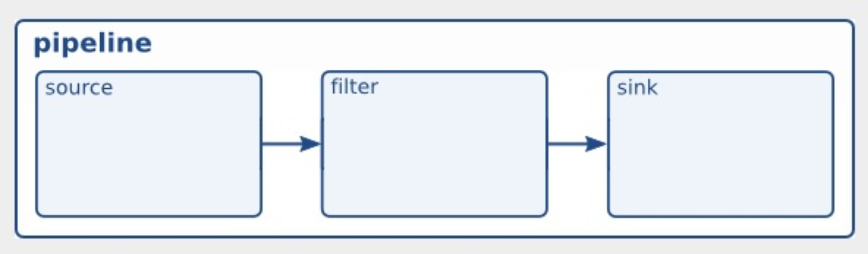
element creation
/*create the elements*/
source = gst_element_factory_make("videotestsrc", "source");
sink = gst_element_factory_make("autovideosink", "sink");
위의 코드를 보면 gst_element_factory_make()를 사용하면 요소를 만들 수 있으며, 첫번째 인자는 어떤 요솔르 만들지에 대한 정보를 제공하고 두번째 인자는 이 특정 instance에 주고 싶은 이름을 전달한다.
videwtestsrc는 source element로서 test vedio pattern을 만드는 역할을 한다. 이요소는 디버깅 목적을 위해서 유용하고 실제 application에서는 별로 좋지 않다.
pipeline creation
/*create the empty pipeline*/
pipeline = gst_pipeline_new("test-pipelie");
gst의 모든 요소는 반드시 사용되기 전에 pipline안에 포함되어 있어야 한다. 왜냐하면 이 요소들은 clocking을 케어하기도 하고 messaging function들을 도와 주기도 하기 때문임. 결국 gst_pipeline_new()로 파이프라인을 생성한다.
/* Build the pipeline */
gst_bin_add_many (GST_BIN (pipeline), source, sink, NULL);
if (gst_element_link (source, sink) != TRUE) {
  g_printerr ("Elements could not be linked.\n");
  gst_object_unref (pipeline);
  return -1;
}
pipeline은 특별한 타입의 bin이다. 이것은 다른요소를 사용하는데 포함되는 요소이다. 모든 methods들은 역시 pipeline에도 적용된다. gst_bin_add_many는 파이프라인에 요소를 더하기 위해 호출된 함수이다. 이 함수는 더해질 요소들을 전달받고 마지막에는 NULL을 전달하면서 끝낸다. 각 요소들은 gst_bin_add()를 통해 더해진다.
하지만 주의할 점은 이 요소들은 아직 서로 linked되지는 않았다는 점이다. 이를 위해 gst_element_link를 사용해야 한다.
properties
/* Modify the source's properties */
g_object_set (source, "pattern", 0, NULL);
대부분의 gst 요소들은 커스텀 properties를 가지고 있다. named attrubutes는 요소의 행동을 바꾸기 위해 수정될 수동 ㅣㅆ다. 또는 요소의 초기 state를 찾는 것을 inquired 될 수도 있다. properties들을 g_object_set()은 NULL로 끝나는 list를 받기 때문에 한번에 여러개를 생성할 수 있다. 위 코드는 videotestsrc의 pattern property를 변화시킵니다. 이것은 해당 요소가 출력하는 test video의 타입을 컨트롤 합니다. 0이 아닌 다른 값을 주고 다시 컴파일 & 실행해보면 다른 영상이 재생되는 것을 알 수 있습니다.
/* Modify the source's properties */
g_object_set (source, "pattern", 2, NULL);
이제 manual에 있는 나머지 코드는 error checking에 해당하는 부분이다.
마지막으로 응용 ver으로 다음과 같이 수정하여 연습해 볼 수도 있겠다.
#include <gst/gst.h>

int
main (int argc, char *argv[])
{
  GstElement *pipeline, *source, *filter, *sink;                                          //Modified
  GstBus *bus;
  GstMessage *msg;
  GstStateChangeReturn ret;

  /* Initialize GStreamer */
  gst_init (&argc, &argv);

  /* Create the elements */
  source = gst_element_factory_make ("videotestsrc", "source");
  filter = gst_element_factory_make("vertigotv", "filter");                               //Modified
  sink = gst_element_factory_make ("autovideosink", "sink");

  /* Create the empty pipeline */
  pipeline = gst_pipeline_new ("test-pipeline");

  if (!pipeline || !source || !sink || !filter) {                                          //Modified
    g_printerr ("Not all elements could be created.\n");
    return -1;
  }

  /* Build the pipeline */
  gst_bin_add_many (GST_BIN (pipeline), source, filter, sink, NULL);
  if ((gst_element_link (source, filter) && gst_element_link (filter, sink)) != TRUE) {    //Modified
    g_printerr ("Elements could not be linked.\n");
    gst_object_unref (pipeline);
    return -1;
  }

  /* Modify the source's properties */
  g_object_set (source, "pattern", 0, NULL);

  /* Start playing */
  ret = gst_element_set_state (pipeline, GST_STATE_PLAYING);
  if (ret == GST_STATE_CHANGE_FAILURE) {
    g_printerr ("Unable to set the pipeline to the playing state.\n");
    gst_object_unref (pipeline);
    return -1;
  }

  /* Wait until error or EOS */
  bus = gst_element_get_bus (pipeline);
  msg =
      gst_bus_timed_pop_filtered (bus, GST_CLOCK_TIME_NONE,
      GST_MESSAGE_ERROR | GST_MESSAGE_EOS);

  /* Parse message */
  if (msg != NULL) {
    GError *err;
    gchar *debug_info;

    switch (GST_MESSAGE_TYPE (msg)) {
      case GST_MESSAGE_ERROR:
        gst_message_parse_error (msg, &err, &debug_info);
        g_printerr ("Error received from element %s: %s\n",
            GST_OBJECT_NAME (msg->src), err->message);
        g_printerr ("Debugging information: %s\n",
            debug_info ? debug_info : "none");
        g_clear_error (&err);
        g_free (debug_info);
        break;
      case GST_MESSAGE_EOS:
        g_print ("End-Of-Stream reached.\n");
        break;
      default:
        /* We should not reach here because we only asked for ERRORs and EOS */
        g_printerr ("Unexpected message received.\n");
        break;
    }
    gst_message_unref (msg);
  }

  /* Free resources */
  gst_object_unref (bus);
  gst_element_set_state (pipeline, GST_STATE_NULL);
  gst_object_unref (pipeline);
  return 0;
}
정리
- 요소를 만드는 방법 : gst_element_factory_make()
- 빈 파이프 라인을 만드는 방법 : gst_pipeline_new()
- 파이프 라인에 요소를 추가하는 방법 : gst_bin_add_many()
- 각각의 요소들을 link하는 방법 : gst_element_link()